
Overview
The eMabler OCPP 1.6 Simulator Charger is a software-based charging station emulator that behaves like a real EV charger and communicates with a backend system using WebSocket and OCPP 1.6 JSON.
The simulator is designed for:
-
Backend integration testing
-
Customer onboarding and validation
-
QA and regression testing
-
Smart charging validation
-
Demonstrations and staging environments
The simulator supports both AC and DC chargers and provides real-time UI-driven state simulation.
Scope
What the Simulator Is
-
A controllable OCPP 1.6 charging station emulator
-
A UI-driven testing tool for simulating real charging sessions
-
A way to validate backend command handling and transaction flows
What the Simulator Is Not
-
Not a physical charger
-
Not suitable for hardware validation or certification testing
-
Not a replacement for field testing
OCPP 1.6 Supported Features
Charger-Initiated Messages (Simulator → Backend)
|
Message |
Description |
|---|---|
|
BootNotification |
Registers charger with backend including vendor and model details |
|
Heartbeat |
Periodic keep-alive message |
|
StatusNotification |
Reports connector state changes |
|
Authorize |
Validates RFID/IdTag |
|
StartTransaction |
Initiates a charging session |
|
StopTransaction |
Ends a charging session |
|
MeterValues |
Sends periodic meter readings |
Backend-Initiated Messages (Backend → Simulator)
|
Message |
Description |
|---|---|
|
GetConfiguration |
Returns charger configuration values |
|
Reset |
Resets the charger |
|
RemoteStartTransaction |
Starts a transaction remotely |
|
RemoteStopTransaction |
Stops an active transaction |
|
SetChargingProfile |
Applies smart charging profile |
|
ClearChargingProfile |
Removes active charging profiles |
|
ChangeAvailability |
Changes connector availability |
|
TriggerMessage |
Triggers specific OCPP messages |
Charger Configuration
Supported Charger Types
-
AC Chargers
-
Single-phase
-
Three-phase
-
-
DC Chargers
-
With DC ramp-up simulation
-
Configurable Parameters
|
Parameter |
Description |
|---|---|
|
ChargerIdentifier |
Unique charger ID |
|
OcppServerEndpoint |
WebSocket URL of backend |
|
SocketCount |
Number of connectors |
|
IsSinglePhase |
Phase configuration |
|
MaxCurrent |
Maximum current (Amps) |
|
MaxVoltage |
Maximum voltage |
|
MeterValueIntervalSeconds |
Meter value transmission interval |
|
HeartbeatInterval |
Heartbeat interval (minimum 10s) |
|
FreeVendingEnabled |
Enables free vending mode |
|
FreeVendingToken |
Token for free vending |
|
IsDcCharger |
DC charger mode flag |
UI and Charger States
The simulator UI reflects real-time OCPP state transitions.
State Flow
Offline
-
Charger is not connected
-
Status: Unknown
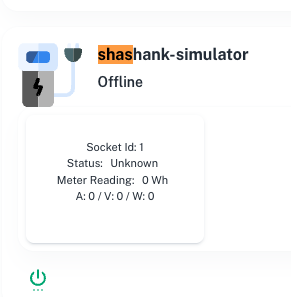
Connected
-
WebSocket connected
-
Charger registered or ready
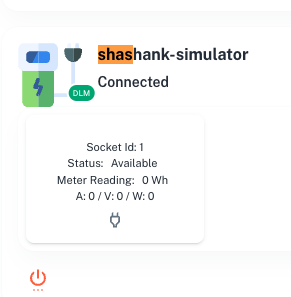
Available
-
Connector ready for charging
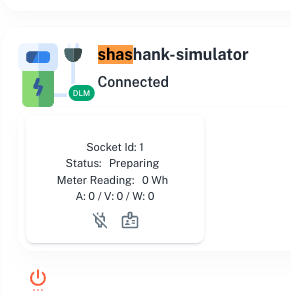
Preparing
-
Cable plugged in
-
Awaiting authorization
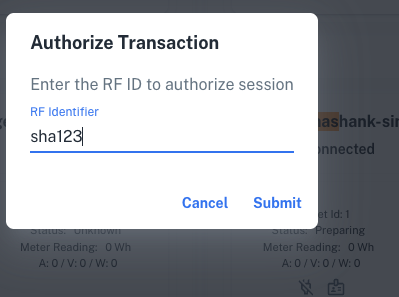
Authorization
-
RFID/IdTag entered
-
Authorize message sent
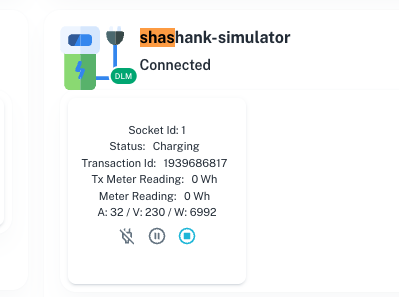
Charging
-
Transaction started
-
Meter values being sent
-
Transaction ID displayed
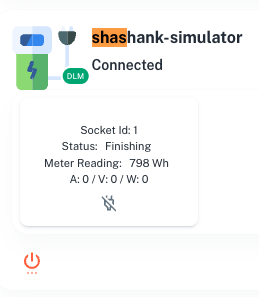
Finishing
-
Transaction stopped
-
Awaiting unplug
Available
-
Cable unplugged
-
Connector ready
Summary of Connector Actions
Each connector supports the following actions:
|
Action |
Result |
|---|---|
|
PlugCable |
Moves connector to Preparing |
|
UnplugCable |
Moves connector to Available |
|
Suspend |
Moves to SuspendedEV state |
|
Resume |
Returns to Charging |
Meter Value Reporting
AC Charger Metrics
-
Current (L1, L2, L3)
-
Voltage (L1-N, L2-N, L3-N)
-
Power Active Import
-
Energy Active Import Register
DC Charger Metrics
-
DC Current
-
DC Voltage
-
DC Power
-
Energy Active Import Register
Smart Charging Support
Supported Profiles
-
TxDefaultProfile
-
TxProfile (Absolute Schedule)
-
TxProfile (Recurring Schedule)
Features
-
Multiple schedule periods
-
Current limits per period
-
Phase control
-
Profile stacking support
Automation Features
Auto Stop Conditions
-
Maximum consumption limit (default 100 kWh)
-
Remote stop command
Connection Management
WebSocket Capabilities
-
OCPP 1.6 subprotocol support
-
Automatic reconnection (exponential backoff, up to 6 retries)
-
Keep-alive interval (120 seconds)
-
Offline message queuing (meter values)
Connection States
-
Connected
-
Offline
Customer Use Cases
Backend Integration Testing
-
Validate boot flow
-
Validate transaction lifecycle
-
Validate authorization handling
Remote Command Testing
-
RemoteStartTransaction
-
RemoteStopTransaction
-
Reset and availability changes
Smart Charging Validation
-
Apply and validate charging profiles
QA and Regression Testing
-
Suspend/resume flows
-
Unplug during charging
-
Offline and reconnect scenarios
Limitations
-
Meter values are simulated
-
No hardware-level validation
-
No physical EVSE component simulation
-
Vendor-specific OCPP extensions not included unless configured
Access and Provisioning
Simulator chargers are provisioned by eMabler upon request.
Once provisioned, customers can:
-
Connect to their backend using WebSocket endpoint
-
Configure charger parameters
-
Simulate charging sessions
-
Test backend command handling