
This release brings automatic charger reboots to Pulse. An automation can now reboot a faulted charger on its own, check whether the fault actually cleared, and notify you differently depending on the answer. Charger IDs are also no longer case sensitive.
Automatic charger reboots
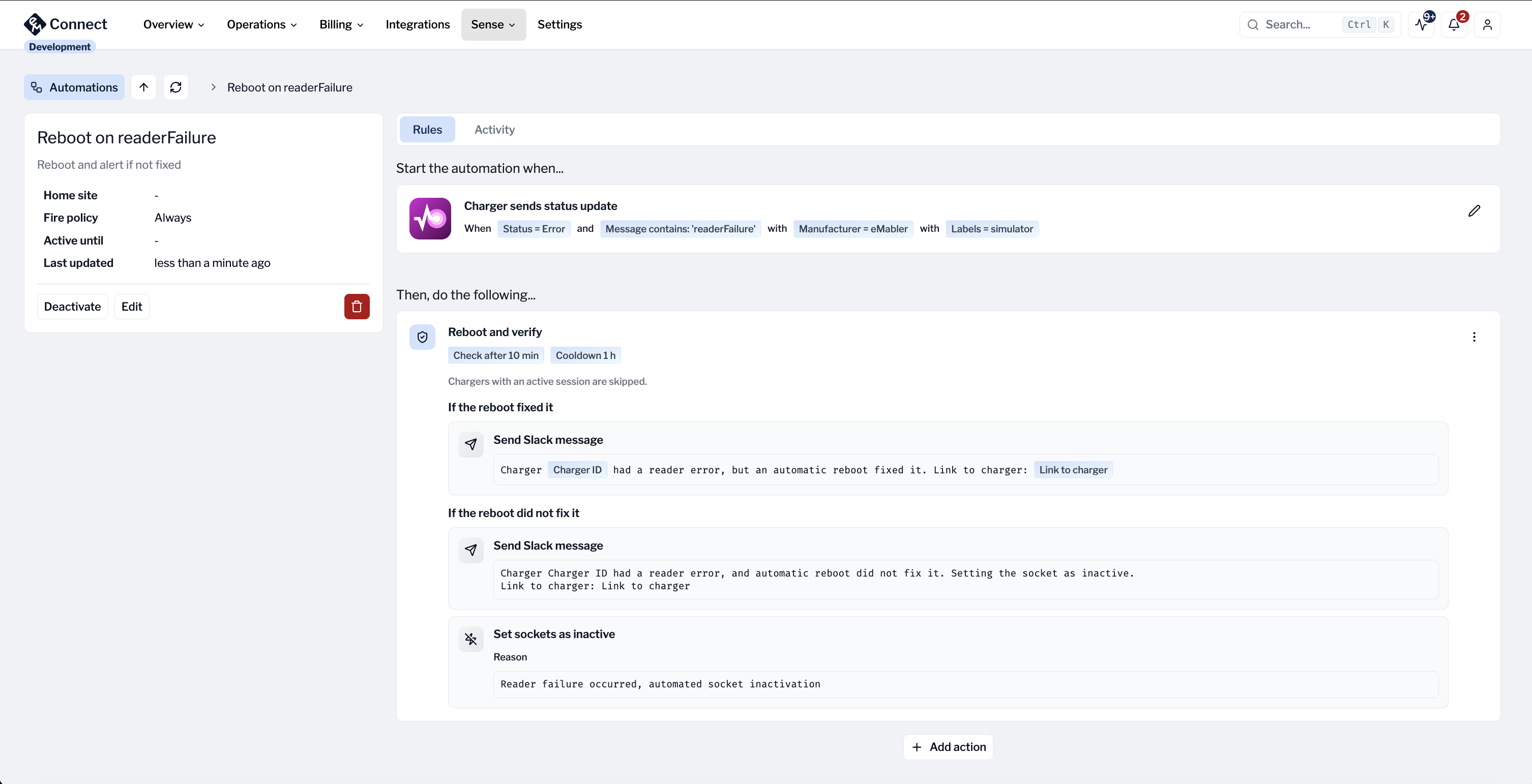
Pulse reboots the charger for you and then tells you whether the problem was resolved.
Most charger faults clear on a reboot, but until now someone had to notice the error, open Connect and press the button. The new Reboot and verify action does that part for you. Add it to an automation on the Charger sends status update trigger, and when a charger reports a status you have set the rule for, Pulse reboots the charger, waits, and then checks whether the fault is really gone.
What you configure on the action:
-
Check the result after: how many minutes Pulse waits before judging the outcome. Anything from 5 to 60 minutes, 10 by default.
-
Cooldown: the same charger will not be rebooted again within this many hours, so a charger stuck in an error loop is not restarted over and over. 6 hours by default, up to 168. Set it to 0 to allow a reboot on every match.
-
If the reboot fixed it: the actions to run when the charger came back without the fault. Send a Slack message, send an email, or leave it empty to stay quiet.
-
If the reboot did not fix it: the actions to run when the fault is still there. This is where you escalate, for example by notifying maintenance and setting the sockets inactive so drivers do not arrive at a charger that cannot serve them.
A reboot ends every charging session on the charger. Chargers with an active session are therefore skipped and picked up on a later match instead.
One thing worth knowing about how the check is judged: if the charger reports nothing at all by the time the check runs, that counts as a failure, not a success. A charger that has gone completely quiet after its reboot escalates rather than looking healthy.
You will find the action in Connect under Sense > Pulse > Automations, when the automation uses the Charger sends status update trigger.
Charger IDs are no longer case sensitive
Charger IDs are no longer case sensitive. Whatever letter case a charger uses when it connects, it should now work in all cases.