
eMabler MCP is out now! You can connect the AI agents you already use to your eMabler data and ask about chargers, sessions, faults and costs in plain language, without building reports or integrations.
eMabler MCP
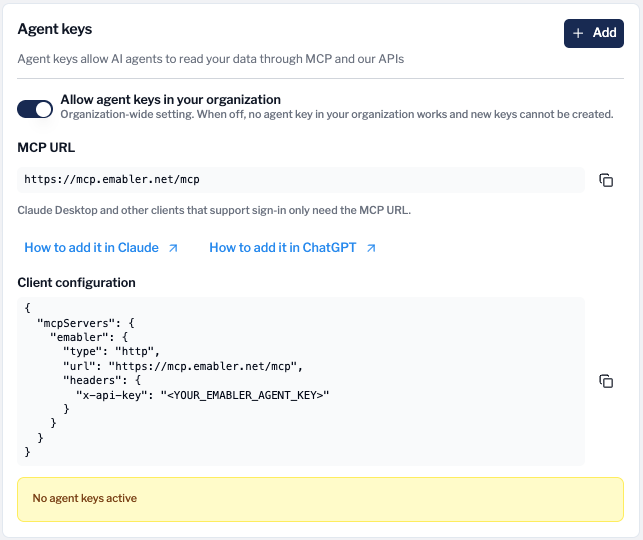
eMabler MCP is a hosted connection built on the open Model Context Protocol. It gives an AI agent of your choice read access to the same data you see in Connect and the API: sites, chargers, sessions, drivers, tariffs and invoices. Ask which chargers at a site are offline, why a session failed, or how success rates compare between your sites this week.
-
Read-only. Your agent can read data, but it cannot change anything or send commands to chargers.
-
You decide what the agent sees. Each agent gets its own agent key, which has the access of the operator who created it, limited to the data areas you select. Driver personal data and financial data are included only if you select them. Keys have an expiry date you choose and can be revoked in Connect at any time.
-
Works with the tools you already use. Claude, ChatGPT, Microsoft Copilot Studio, GitHub Copilot in VS Code, Gemini Enterprise and n8n, among others.
To get started, a Global Admin switches on Allow agent keys in your organization under Settings > Developers in Connect. Then add the eMabler MCP URL shown on the same page to your AI client and sign in with your Connect account.
Setup guides for each AI client, the full list of data areas and the current limits are in our Knowledge Portal: eMabler MCP.
eMabler MCP is included in the platform fee on our 2027 pricing. On earlier pricing it is a paid add-on, so check with your Customer Success Manager.
If you have any questions regarding these changes, feel free to contact us at our Service Desk or at support@emabler.com